


Original price was: $2,040.00.$180.50Current price is: $180.50.
AUTODESK FUSION 360 For Windows/Mac
our productarchitecture 3D- CAODelivery contents :
 |
Activation before payment  |
|
Activation Instantly via WhatsApp or Email |
|
Payment via WhatsApp  Or Email Or Email  |
 |
 |
 |
 |
Description

 What is Autodesk Fusion 360?
Autodesk Fusion 360 is a cloud-based 3D CAD, CAM, and CAE (Computer-Aided Design, Manufacturing, and Engineering) software platform. It is designed for product development that combines industrial and mechanical design, simulation, collaboration, and machining in a single package.
-
Accelerate design and documentation
-
Advance design automation
-
Improve collaboration and coordination
How do you justify such a low price?
Unlike all other sites, we allow PROTECTED purchases with PAYPAL because we have official and updated licenses, compliant and guaranteed at the best price on the market.
You will not download your license(s) from any external site, but directly from Autodesk™.
How will you receive the License?
- Purchase the Autodesk Autodesk Fusion 360 License.
- You will receive an email from Autodesk at the email address provided on the order form within 24h.
- Follow the instructions in the email and access Autodesk™.
- Download the program you have purchased directly from the official Autodesk™ website.
- Start working.
Key features of Autodesk Fusion 360
- Parametric Modeling: Fusion 360 offers parametric modeling capabilities, allowing engineers and designers to create 3D models with parametric constraints and history-based editing. This means designs can be easily modified and updated throughout the design process.
- CAD (Computer-Aided Design):
- Solid Modeling: Create solid models of parts and assemblies.
- Surface Modeling: Design complex organic shapes using surface modeling techniques.
- Sheet Metal Design: Design sheet metal components and assemblies, including flat patterns and bend tables.
- CAM (Computer-Aided Manufacturing):
- Toolpath Generation: Generate toolpaths for CNC machining operations directly from 3D models.
- Simulation and Verification: Simulate toolpaths to ensure they are collision-free and optimize machining processes.
- Post-Processing: Generate G-code for specific CNC machines.
- CAE (Computer-Aided Engineering):
- Simulation: Perform structural and thermal simulations to analyze how designs will perform under real-world conditions.
- Modal Analysis: Analyze natural frequencies and mode shapes of designs to ensure structural integrity.
- Collaboration and Cloud Integration:
- Fusion 360 is cloud-based, enabling real-time collaboration among team members working on the same project from different locations.
- Share designs, collaborate on models, and manage version control through Autodesk’s cloud infrastructure.
- Rendering and Visualization:
- Create photorealistic renderings of designs to visualize how products will look in real life.
- Use animation and exploded views to communicate assembly and disassembly processes.
- Data Management:
- Manage design files, revisions, and project documentation in a centralized cloud environment.
- Access design data securely from anywhere, using any device connected to the internet.
- Additive Manufacturing:
- Prepare designs for 3D printing and additive manufacturing processes.
- Generate supports, optimize orientation, and export files in various formats suitable for 3D printing.
Reasons to use Autodesk Fusion 360
- Product Design: Used by engineers and designers to develop consumer products, machinery, industrial equipment, and more.
- Prototyping: Create functional prototypes for testing and validation before manufacturing.
- Education: Widely used in educational institutions to teach CAD/CAM/CAE concepts and techniques.
- Maker Community: Popular among hobbyists and makers for designing and fabricating personal projects.
Compare related products
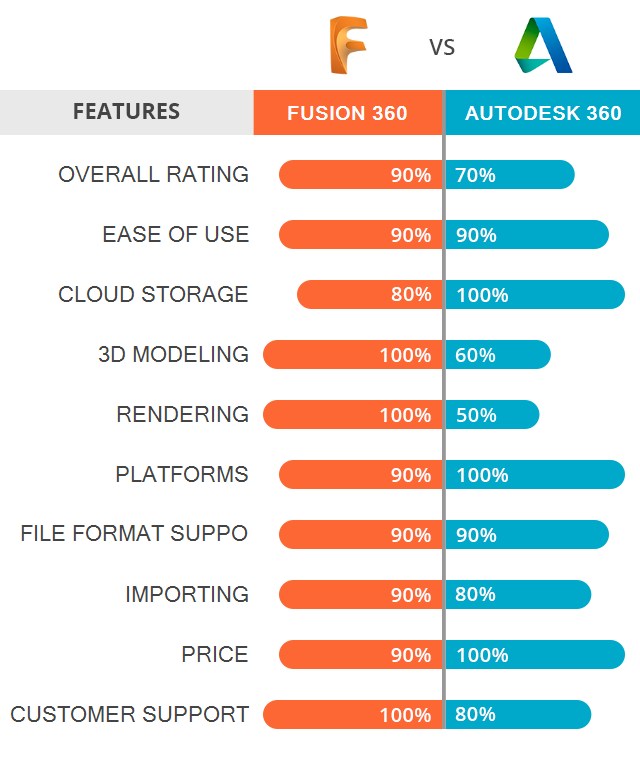
for more information please contact us
Frequently Asked Questions
How does ordering work?
1) Place your order and leave your email address or your WhatsApp number. 2) We contact you to confirm which email address to activate. 3) We activate it, usually within a few minutes, and send you all the instructions. 4) You pay after activation.
Do I get a license key?
No. The software is activated on your email address, so the license is linked to that email. You receive all the instructions to sign in and use it.
Do I pay before or after activation?
After. You pay once your email is activated, by credit or debit card, PayPal or bank transfer.
Can I choose which email address is activated?
Yes. We confirm the email address with you before activating.
How long does activation take?
Usually a few minutes after we confirm your email address.
Which payment methods do you accept?
Credit or debit card, PayPal and bank transfer.
What do I need to place an order?
Only an email address or a WhatsApp number.
What if I do not have WhatsApp?
No problem. Just use your email. We contact you by email and send all the instructions there.
Additional information
| Operation system | MAC, WINDOWS |
|---|
DELIVERY & PAYMENTS
DELIVERY:
All products available on www.mydigitallicense.com are DIGITAL. After you place your order, we contact you by WhatsApp or email to confirm which email address to activate. We activate it, usually within a few minutes, and send you all the instructions.
There is no license key: the activation is linked to your email address. No WhatsApp? No problem, your email is enough: we contact you by email and send all the instructions there.
IMPORTANT: please enter your email address carefully when you order. Our emails are sent from “support@mydigitallicense.com“. If you have not received anything, please check the “SPAM” folder.
If you encounter any issues, please reach out to us here.
PAYMENTS :
You pay after activation: by credit or debit card, PayPal or bank transfer.
WARRANTY

In accordance with our company policy, we provide comprehensive protection for
all our products. This includes a money-back guarantee valid for up to 30 days after purchase, as well as technical support for all
your acquisitions.
Customers have the option to receive a full refund if the license remains unactivated within the specified timeframe or to explore the possibility of a replacement with a
product of equal value. Further details on Returns and Refunds can be found here.
Moreover, all our products come with coverage and assurance from TrustedShops, included in the purchase price, providing comprehensive protection for your order.
You can review the policies and buyer protection here. For any additional inquiries or information concerning license matters, please reach out to us via email at “support@mydigitallicense.com” or through the dedicated contact page.
Be the first to review “AUTODESK FUSION 360 For Windows/Mac”
Related Products
-
 Price range: $29.95 through $73.95
 -
 Price range: $49.95 through $125.95
 -
 Price range: $39.50 through $105.00
 -
 Original price was: $125.00.$13.50Current price is: $13.50.

There are no reviews yet.